
Graphics and media
anvl_gpu draws everything: shapes, text, icons, pictures and video,
in a handful of GPU passes per frame. You rarely touch it directly; Ui fills its draw
list for you.
The renderer
let icons = IconAtlas::build();
let mut renderer = Renderer::new(window, width, height, &icons);   // per window
renderer.resize(new_width, new_height);                            // on WindowEvent::Resized
match renderer.render(&ui.draw, &mut ui.text, ui.theme().bg) {
    FrameStatus::Presented => {}
    FrameStatus::Skipped => {}            // minimized or hidden
    FrameStatus::Reconfigure => renderer.reconfigure(),
}
Renderer::new_headless(w, h, &icons)draws without a window, andrender_to_framereturns the pixels. Tests use it; it isNoneon a machine with no GPU.- Backends: DirectX 12 on Windows, Vulkan or GLES on Android and Linux, Metal on macOS. Presenting is vsync'd with one frame in flight.
renderer.timings()reports how long the last frame waited for the display and how long its own work took.
Shapes
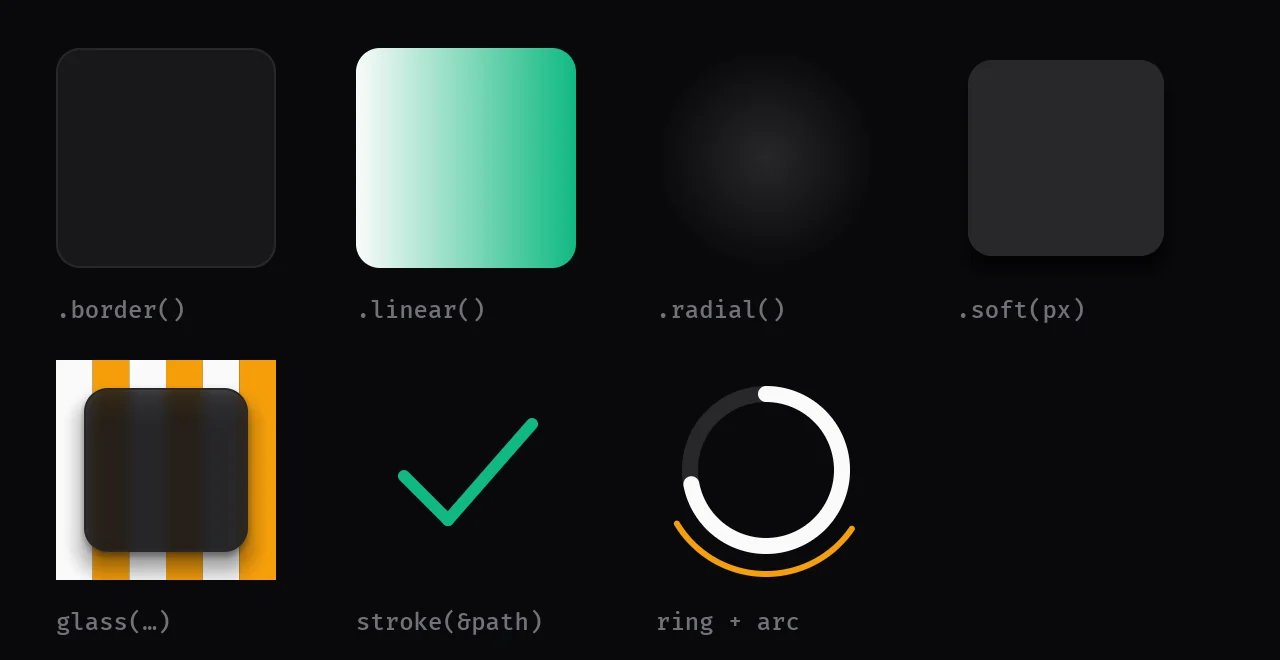
Rectangles are signed-distance shapes drawn in one instanced pass, so rounded corners, borders, soft shadows and gradients cost the same as a plain fill:
ui.rect(r, RectStyle::fill(t.card).radius(ui.s(12.0)).border(t.border, 1.0));
ui.rect(r, RectStyle::fill(t.primary).linear(t.success, 0.0));   // linear gradient, angle in radians
ui.rect(r, RectStyle::fill(t.card_hi).radial(t.bg));             // radial gradient
ui.rect(r, RectStyle::fill([0.0, 0.0, 0.0, 0.4]).soft(ui.s(16.0)).radius(ui.s(12.0)));   // a soft shadow
Paths and strokes
Lines, arcs and Bézier paths are stroked with anti-aliased distance fields:
use anvil_ui::path::Path;

let check = Path::new().move_to([4.0, 12.0]).line_to([9.0, 17.0]).line_to([20.0, 6.0]);   // physical px
ui.stroke(&check, ui.s(2.0), t.success);
ui.arc(center, radius, 0.0, std::f32::consts::PI, ui.s(3.0), t.primary);
ui.progress_ring(center, radius, ui.s(4.0), 0.6, t.primary);
Icons
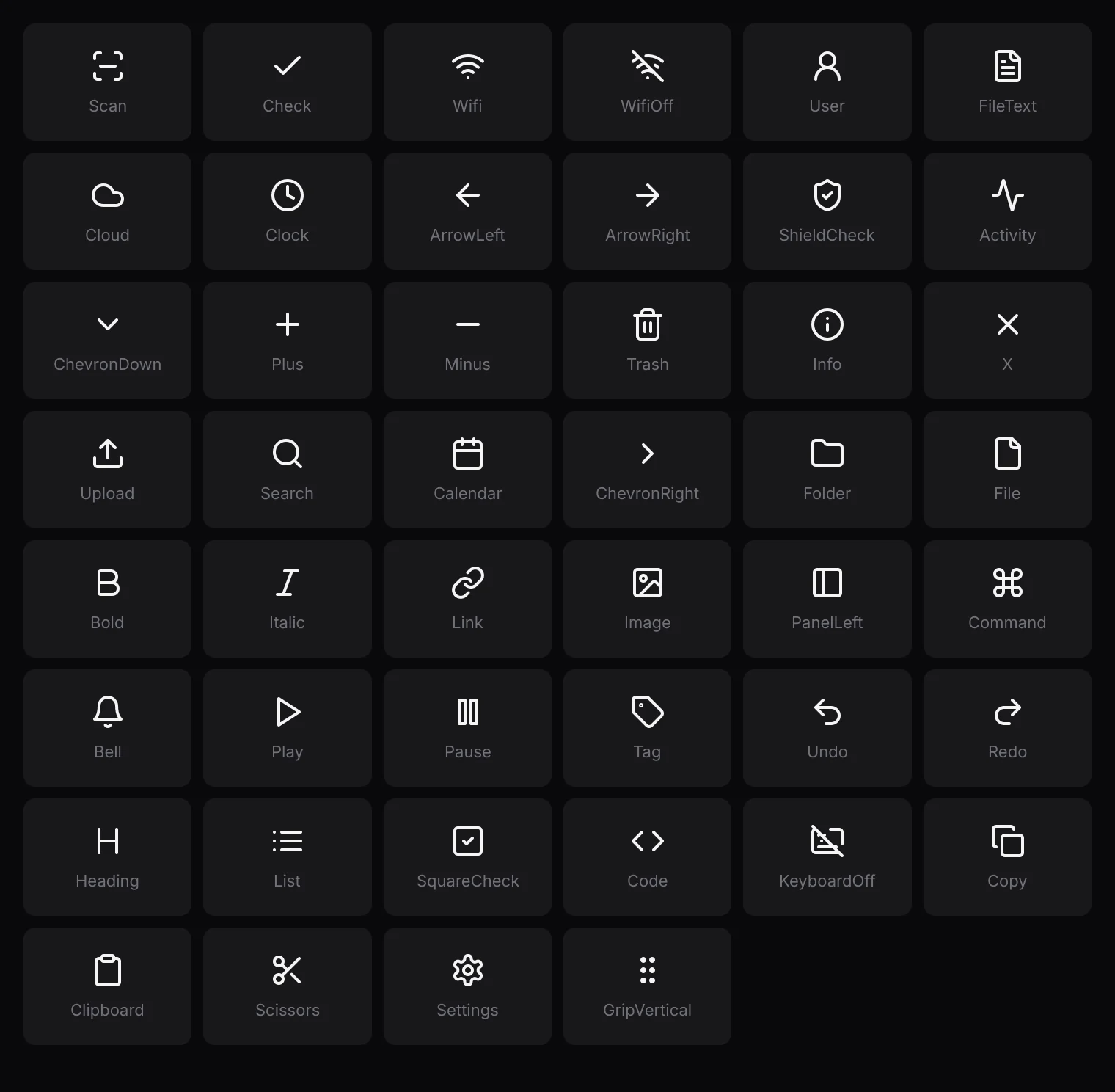
Icons are baked into one atlas at build time and drawn with ui.icon(r, Icon::Check, color)
or icon(Icon::Check) in a tree. The set: Scan, Check, Wifi, WifiOff, User, FileText,
Cloud, Clock, ArrowLeft, ArrowRight, ShieldCheck, Activity, ChevronDown, ChevronRight, Plus, Minus,
Trash, Info, X, Upload, Search, Calendar, Folder, File, Bold, Italic, Link, Image, PanelLeft,
Command, Bell, Play, Pause, Tag, Undo, Redo, Heading, List, SquareCheck, Code, KeyboardOff, Copy,
Clipboard, Scissors, Settings and GripVertical. They are Lucide icons, rasterized by the
bake_icons example; add one there and re-run it.
Images
ANVL decodes PNG, JPEG, GIF and BMP itself:
let frame = anvil_ui::decode_image(include_bytes!("../assets/cover.png"))?;
let texture = renderer.upload(&frame);     // once
ui.image(r, texture, Fit::Cover, 12.0);    // every frame; radius in logical px
// or in a tree: img(texture).w(320.0).h(180.0).rounded_lg()
Fit::Cover fills the box and crops, Contain shows all of it,
Stretch fills it exactly. renderer.update(texture, &frame) replaces a
picture's pixels (for a camera preview or a video frame).
The ANVL logo
LogoTextures::build(&mut renderer, scale) rasterizes the ANVL mark and wordmark at
the exact pixel size they are drawn, from vector outlines, so they are sharp at any scale. Rebuild
them when the scale factor changes. logo::mark_frame(px) gives the mark as pixels, for a
window icon.
Video
Video::open(bytes) plays a video file from memory through the operating system's
own decoders (Media Foundation on Windows, MediaCodec on Android). They use the GPU's hardware
decoder where there is one, play every codec the system has, and add nothing to your binary. Video
plays without sound and loops. Each frame, advance it and upload the new picture:
let mut video = Video::open(std::fs::read("intro.mp4")?)?;
let texture = renderer.upload(video.frame());
// each frame:
if video.advance(dt)? {
    renderer.update(texture, video.frame());
}
ui.image(r, texture, Fit::Contain, 0.0);
Clipping and opacity
ui.push_clip(r) … pop_clip() clips everything drawn between them;
clips nest. ui.set_opacity(a) fades everything drawn until it is set back, and returns
the previous value.